The list of equipment that are available for CEHD faculty and staff to borrow.
- Fill out the equipment request form to request for a reservation.
- Pick up location: 104 Burton Hall.
Media Equipment List
Swivl Kits
Swivl is a robotic platform that can be used for recording presentations, class lectures, or active group work. The robot rotates around to keep the camera (of a smartphone or tablet) focused on the primary speaker; additional microphones can record secondary speakers or conversation from around the room.
Important: You will need a smartphone or tablet and be able to download and install the free Swivl app. You will need to set up a free Swivl profile.

When would you use it?
To record or live stream a meeting, event, or class
Advantages
It is hands-free. The Swivl robot automatically follows the instructor as they move around the room. It can be integrated with Zoom and Google Meet. Multiple microphones can record student/audience participation from around the room.
Disadvantages
Learning curve
What's in the box?
Unboxing video (4:13)
- Swivl robot
- (3) Three markers (look like a small remote) – any of which can be designated the Primary Marker
- Neck lanyard and clip for Primary Marker
- Wrist lanyard for Secondary Markers
- (2) Two 3-port USB charging block and USB to 3.5 mm barrel plug cable for charging Robot (Primary marker charges when docked in the base)
- USB to “hammerhead” plug cable for charging Secondary markers
- USB-C to Lightning Cable for iOS devices
- USB-C to USB-C Cable for newer Android and iOS devices
- Swivl Expand Lens Mini
- Shims
- Tripod
iPads
There are two (2) Wifi-only iPads available for check out. The iPads are 7th generation and have 32 GBs of storage. The iPads come preinstalled with a few commonly used apps.
- Swivl
- Canvas Student
- Google Doc, Google Sheets, Google Drive
- VoiceThread
- iMovie
- YouTube
- Zoom
- Adobe Spark Video
If you have suggestions for other free apps, please provide this information via the feedback request form.
In the bag
iPad and charging cable
Camcorder
The Canon Vixia HF R300 is a compact camcorder that records HD video onto a memory card. While the camcorder has a built-in microphone, you can plug in an external microphone to capture better audio and even plug in your headphones. You can transfer your videos onto your computer for editing and dissemination.
When would you use it?
To capture video and audio of a meeting, event, or class
You might also need to reserve
A tripod and microphone
Power Supply
Rechargeable battery or the power supply cord
Important things to consider
Allow yourself extra time when you are reserving the camcorder for the following:
- If you plan to use the battery, you will need extra time to charge it.
- You are responsible for transferring the video files off of the camcorder. CEHD staff are not responsible for retrieving your media.

In the bag
- Camera with memory card
- Rechargeable battery
- Power supply cord, also used to charge the battery
View a video tutorial on how to use the Canon Vixia camcorder (2 mins).
Tripods
- (x2) Sony VCT-R640: lightweight tripod.
- (x2) Magnus VT-300: medium tripod.
Mount for Smart Devices
When would you use it?
To record a video with your own device
You might also need to reserve
A tripod, microphone, and an iPad
Mounts Available to Check Out
- Tablet Mount: JOBY Griptight Mount Pro Tablet Mount
- Phone Mount (for small smartphones): JOBY Griptight Mount PRO Smartphone Mount
- Phone Mount (for large smartphones): JOBY Tight Mount for larger phones
Wireless Microphones
Overview of Wireless Microphones
When would you use it?
- Hyflex or hybrid class to provide the freedom to circulate around the room while speaking
- online meeting, event, or class
- capture audio in an instructional video
Advantages
There is no cord. Hands free. You are able to walk away from your computer, presentation device, or podium without worrying about a wire.
Disadvantages
- battery-powered
- potential connection interference
Power Supply
Two (2) AA batteries. You will need to supply your own battery if the current batteries are low.
Samson USB Wireless Mic Kit
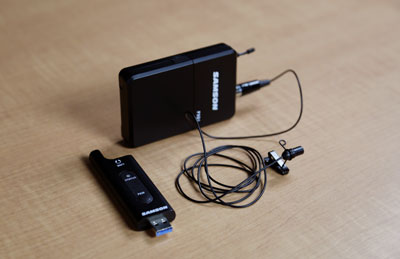
In the bag
- Transmitter: a USB plugin
- Microphone pack
- Lapel microphone and clip
View a video tutorial on how to use the Samson USB Mic Kit (1 min).
Azden Wireless Mic Kit
Power Supply
You will need to charge both the transmitter and microphone pack.
Important: Please allow yourself extra time in the reservation to charge the rechargeable batteries.

In the bag
- Transmitter
- Transmitter 3.5mm cord, used to connect the transmitter to your device
- Microphone pack
- Two lapel microphones and clips
- Charging cord
- TRRS connector, might be needed if connecting to an Apple laptop
View a video tutorial on how to use the Azden Wireless Mic Kit (3 mins).
Sony Wireless Mic Kit

Power Supply
Uses two (2) AA batteries in both the transmitter and microphone pack for a total of four (4) AA batteries.
In the bag
- Transmitter
- Transmitter 3.5mm audio connection cord, used to connect the transmitter to your device
- Microphone pack
- Lapel microphone and clip
- TRRS connector, might be needed if connecting to an Apple laptop

View a video tutorial on how to use the Sony Wireless Mic Kit (2 mins).
Wire Microphones
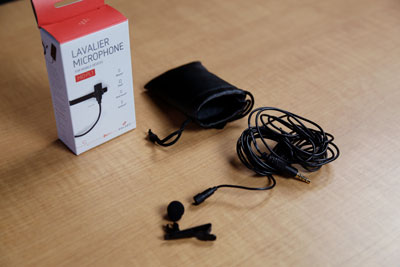
Lapel Microphone
When would you use it?
Online meeting, event, or class; capture audio in an instructional video and will remain stationary;
Advantages
- Hands-free
- no need to worry about battery or connection interference
Disadvantages
It is wired so there is limited ability to walk away from the microphone.
Power Supply
Your computer or device will provide the power once plugged in.
In the bag:
- Lapel microphone with 3.5mm audio connection cord
- Microphone clip
- Wind screen
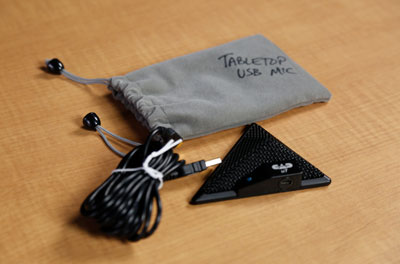
Tabletop Boundary USB Mic
When would you use it?
Online or hybrid meeting, event, or class;
Advantages
Hands-free, only need one microphone for everyone in the room
Disadvantages
The microphone is sensitive to surface vibrations
Power Supply
Your computer or device will provide the power once plugged in.
In the bag:
- Microphone: model is the CAD U7, triangular-shaped boundary mic
- 10-feet USB-A connection cord